
BrainStorm: Agentic AI for JD Edwards
A governed agentic AI platform for JD Edwards® EnterpriseOne. Ask for an outcome: BrainStorm searches approved sources, selects the right Orchestration or Composition, explains what it will do, and acts under the signed-in user’s own JDE identity. The complete stack — web app, RAG retrieval and MCP servers — ships in one installer; add the LLM of your choice, including a local one.
BrainStorm is the complete agentic AI stack from the user’s screen to the JDE record: a web-based chat application with its own built-in webserver, RAG retrieval over your documents, and an extensible set of MCP servers for JDE Orchestrations and governed Compositions. Just add the LLM of your choice — including a local one. Every conversation and action runs under the user’s own JDE identity. No parallel API. No shadow integration. No surprises.
Unlike a conventional AI chatbot, the BrainStorm agent can move from question to evidence to action. It can find the relevant JDE data and supporting documents, select an approved capability, explain the proposed operation, request confirmation when data will change, and execute it with the audit trail JD Edwards would have produced from its native screens. The user can open the exact source page behind a grounded answer — instantly.
- Understands the request, gathers evidence, chooses an approved tool and acts.
- Human confirmation before write actions, with the exact payload shown.
- Every grounded answer cites its sources, with the source pages in view.
- Runs under the user’s JDE identity. No shared agent account and no shadow integration.
- Local LLM (Ollama) or hosted frontier model (OpenAI, Claude, Gemini).
- Web app and mobile PWA; nine UI languages, auto-detected.
- Extensible through standard MCP servers and governed Compositions.
More than chat: understand, find, choose and act
Agentic AI does not stop after generating an answer. It works towards a requested outcome by gathering evidence, selecting from approved tools and taking controlled action. BrainStorm applies that model to JD Edwards EnterpriseOne without giving the AI unrestricted access to JDE.
Understand the outcome
The user asks in business language. The AI agent retains the conversation and determines what information or action is actually required.
Ground the answer
It searches entitled document corpora and approved JDE data capabilities, then cites the exact source pages behind its answer.
Choose an approved tool
The agent selects only from the JDE Orchestrations and governed Compositions published to the signed-in user’s groups.
Execute with authority
Write actions are explained and confirmed first, then executed under the user’s own JDE identity with the native audit trail.
It asks before it writes, and shows you exactly what it will send
Told to approve a purchase order, BrainStorm reads the order back, states that the action will change data in JD Edwards®, names the capability it intends to call, prints the literal payload, and waits.
The approval happens on the word “yes”. Afterwards, the record JD Edwards keeps carries the signed-in user’s own ID — not a service account.
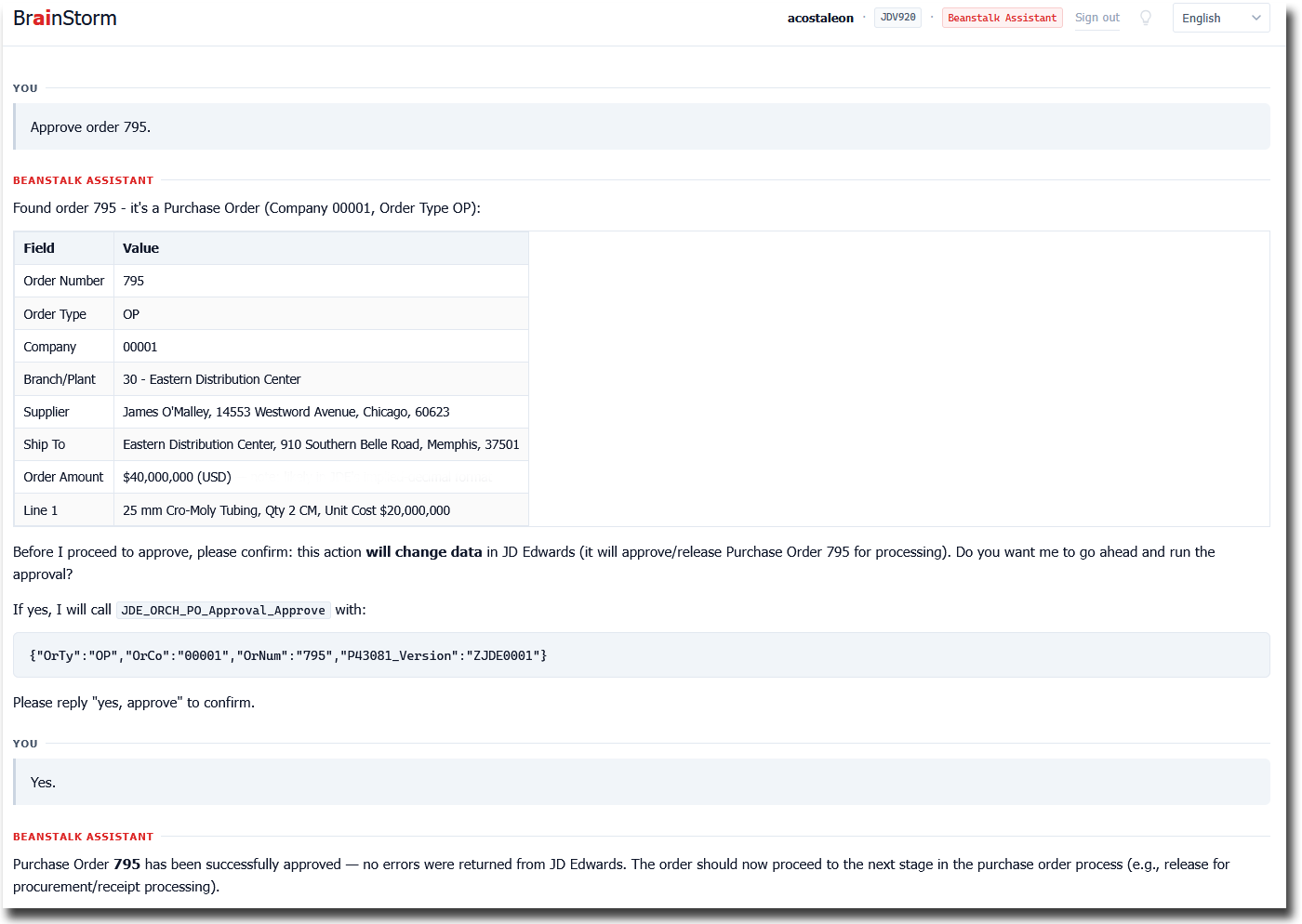
JD Edwards demonstration data (JDV920).
Several layers of guidance, so the same question gets the same answer
The usual objection to putting a language model near an ERP is that it is not deterministic: ask twice, get two answers. That is true of a model left to improvise. It stops being true once the model is choosing from a fixed set of capabilities rather than composing the work itself.
Guidance is applied in layers, and each layer narrows what the next one can do. By the time anything reaches JD Edwards®, the model has selected an operation — it has not invented one.
- What the user is entitled to. The published catalogue for that user’s groups is the whole menu. A capability that was not released to them does not appear, so it cannot be chosen, argued for, or reached by a cleverer prompt.
- What each capability says about itself. A published capability carries its own usage guidance: what it is for, when it applies, what it needs, and what it will not do. The agent reads that rather than guessing from a name.
- What the parameters allow. Inputs are typed and checked before anything runs. A missing or malformed value is a question back to the user, not an improvised default.
- House rules for the deployment. Standing instructions apply across every conversation — how to resolve an ambiguous supplier, when to ask rather than assume, which figures always carry their basis, what to do with a warning.
- Confirmation before anything changes. A write is read back in full, the capability is named, the literal payload is printed, and nothing happens until the user says so.
- The capability does the work, not the model. The selected Composition or Orchestration executes exactly as it was built and tested. Two users, two sessions, two phrasings — the same selected capability performs the same operation, with the same validation and the same audit trail.
The wording of an answer may vary, because language does. The operation does not.
- Free to vary: how a question is phrased, how an answer is worded, which follow-up is offered.
- Constrained: which capability is selected, and with what parameters.
- Fixed: what that capability then does, and the record it leaves behind.
This is also the practical answer to “can we audit it?”. What ran is a named, versioned capability with a payload, not a sentence the model produced on the day.
Don’t ask for an application. Ask for the outcome.
JD Edwards® Orchestrations already changed what enterprise functionality can be: powerful read/write services, built through AIS, without the weight of traditional custom development. BrainStorm turns that capability into a new way to work. Instead of asking for a new application, a new batch job, or a new set of custom objects, the user simply asks for the business outcome they need — and the AI agent searches, reasons over the available evidence and invokes the right approved Orchestrations and Compositions to get it done. Where no Orchestration exists — or building one would be two hundred clicks of overkill — a governed Composition packages the same outcome in minutes. The LLM can also search any supporting documentation, perfecting its answer on the fly.
This moves JDE enhancement, customization and development from the legacy development-heavy model to a lighter modern capability-first approach — Orchestrations and Compositions alike. Requirements become smaller, clearer and faster to deliver. Solutions become easier to maintain, easier to secure and easier to evolve — with less reliance on invasive customisations, fewer long delivery cycles, and a much faster way to turn business needs into working enterprise processes.
One interface covers question, search and action: the user asks, the answer cites its sources, and the action runs under their own JDE identity with the audit trail the native screens would have produced. The same application installs as a mobile PWA — nothing separate to build, deploy or secure.
- Development-heavy → much lighter capability-first
- New custom objects → existing, approved services
- Long delivery cycles → small, clear, readily achievable requirements
- ‘Yet another application’ → one interface for question, search and action
What it does
- Conversation, not click-paths. Ask in natural language. Get a detailed written answer with citations, grounded in fact. Follow up. Switch topic. The chat remembers the conversation; the user doesn't have to.
- JDE Orchestrations and Compositions, conversationally. Through MCP servers that expose your existing Orchestrations and published Compositions as typed tools, the user can trigger anything they are already permitted to call — from chat. Same authentication. Same audit.
- Governed Compositions, conversationally. Reusable black-box capabilities — packaged answers from data, JDE’s own business logic, whole transactions — published to the user’s groups and used in the same conversation, under the same identity.
- Provide your own documentation. Vendor manuals, internal policy documents, engineering specifications, training material, change logs — whatever your team needs to consult. The built-in retrieval engine ingests it and the chat can quote from it.
- Source-anchored answers. Every claim links to the page it came from. The user sees what the AI saw — not just the model's summary of it.
- Bring your own LLM. Local models via Ollama for cost and privacy. Hosted frontier models (OpenAI, Claude, Gemini) when the question warrants it. The choice is configuration, not architecture.
Included capabilities
BrainStorm arrives with a catalogue of published capabilities. They are included in the licence rather than priced individually, and the catalogue grows — anything you add joins it under the same governance.
21 included capabilities as at August 2026
| Area | Included capabilities |
|---|---|
| Accounts payable | Supplier open AP position · open pay items with ageing · receipts with no voucher yet · voucher status · payments applied to a voucher · purchase order and receipt match evidence · find the voucher for a supplier invoice reference |
| Purchasing and approvals | Purchase orders held awaiting approval · purchase order progress and detail · create a purchase order |
| Sales | Invoiced sales value and order count by branch · open-order value and count by branch |
| Inventory | Item availability by branch/plant · find an item from a part number, an external number or a description fragment |
| Finding the right record | Resolve a customer, supplier or employee from imperfect input · list the branch/plants for a company — used by every area above, built once |
| Making coded data readable | Describe a user defined code · list the values for one · describe a single value |
| Session and identity | The signed-in user’s own address book number · current user, server and timestamp |
The accounts payable row is worth reading twice. Sold elsewhere, that set of seven would be a “Payables Agent” — one sealed package, separately priced. Here they are seven capabilities, each usable on its own and each reusable by anything else entitled to it. The supplier resolution the payables work depends on is the same one purchasing and sales use.
Composer is how you add to this catalogue, and the evidence page shows several of these capabilities in use.
Sources & citations
The retrieval engine automatically digests any documents dropped into a configured folder. PDFs — including scanned ones.
When the chat draws on a document to answer a question, the response includes inline links to the relevant document pages. Not a paraphrase, not a snippet, not a reformulation. The actual page.
This matters in two directions. The user trusts an answer that comes with its receipts. And the auditor can confirm, after the fact, exactly what evidence the model was working from.
Per-corpus access control means a user only sees citations from corpora they are entitled to see. A field engineer sees vendor manuals; a payroll clerk does not. The same identity that governs JDE access governs corpus access.
For CNC & security
- The user's JDE identity, end to end. The user signs in once. From that point on, every Orchestration call — whether triggered conversationally or directly — runs under their real JDE user. Not a service account. Not a pool. Not a proxy.
- No parallel API. BrainStorm reaches JDE only through the same AIS surface every other AIS client uses. Whatever Orchestrations your CNC team has already approved — and whatever Compositions have been published to the user’s groups — is the entire menu.
- No shadow integration. Nothing reaches the JDE database outside a published, governed capability. Nothing bypasses security. Nothing escalates privilege.
- Audit is JDE's own. Because the calls are real AIS calls, JDE's audit captures exactly what would have been captured if the user had clicked through the screens. No separate audit log to reconcile.
- Corpus access scoped per user. Document corpora are tagged with the personas or groups permitted to consult them. The chat never quotes from a corpus the current user cannot see.
- Local LLM option for sensitive content. Configure BrainStorm against a locally hosted model and no part of the conversation, retrieval, or response leaves your LAN.
- Sign in the way your organisation does. JD Edwards credentials; single sign-on through XpreSSO or the ESI JDE SSO Suite with the identity providers they already front — Microsoft Entra ID, Okta, ADFS, PingOne, Auth0 and other SAML 2.0 / OpenID Connect providers; Windows credentials; or Integrated Windows Authentication through Kerberos, with no prompt at all on a domain PC. The server offers the methods you enable; the user picks one at the login screen and the choice is remembered.
- The same identity reaches the MCP tools. Beyond JDE, BrainStorm reaches file shares, servers, logs and databases through Steward, where access happens as the signed-in person under their existing permissions — and where the audit records that it was BrainStorm they used. Sites with an AI identity gateway can route BrainStorm through it using the standard MCP authorization flow.
What the audit actually looks like
A purchase order approved from chat, and the record JD Edwards kept afterwards. The approval flag is set on that order and not on its neighbours, and the released-by column holds the signed-in user’s own ID. Other rows in the same view were released by other actors, which is how you can tell the column carries real information.

The full sequence — the question, the confirmation, the approval and this record
Languages & mobile
The UI runs in nine languages and detects the user's preference automatically — English, German, French, Spanish, Italian, Portuguese, Polish, Czech and Hungarian. The conversation itself is in whatever language the user types in.
BrainStorm is also a Progressive Web App. On a phone it installs to the home screen with one tap and runs full-screen, like any native app. No App Store. No Play Store. No code-signing. No corporate MDM hoop-jumping. The URL is the install.
The result is a JDE mobile app with no separate development, no separate deployment and no separate security model — the same governed application, installed from the browser.
Licensing
Annual subscription, sized by named users and production / non-production servers per edition. A fixed-price Pilot / Proof-of-Value is available to remove buyer risk. Contact us for a demo or quote, or see the pricing page for editions and indicative figures.
It does not have to be JDE, and it does not have to be a person asking
BrainStorm began as an assistant for JD Edwards. Three additions widen that considerably, without changing what it is: one governed assistant, one identity, one audit.
Works without JDE
A Windows or single-sign-on session is a complete BrainStorm session on its own. Every MCP capability reachable through Steward — logs across servers, files, JDE metadata, a security platform’s read-only tools — is available to it, and a JD Edwards session is added when the estate has one, not required before anything works. A site with no JDE at all gets an assistant over its own enterprise tools, under each user’s own permissions.
Scheduled work
A scheduler runs a configured prompt on a cadence under a dedicated service identity — every ten minutes, every night, since the last successful run — through the same tools, the same policy and the same audit as an interactive session. A security watch over production servers is the obvious use; a nightly reconciliation question, a morning summary of overnight batch logs, or any recurring investigation is the same mechanism. Findings arrive as a fixed-shape report; a severity threshold sends a notification.
Investigations on demand
The same watch can be started from outside — a security workflow hands BrainStorm a detection and polls for the finding — and its findings cite evidence records rather than pasted log text: which server, which file as it was at the time, which line, and a hash that either still verifies later or tells you the file has changed. “The AI said so” becomes “here is the record, re-check it.”
How these fit with identity gateways and security platforms, in diagrams: Enterprise AI integration patterns
Acts through a governed catalogue — not another monolithic agent per process
A competitor’s “Payables Agent” or “Buyer Agent” is usually a sealed package of the same recurring parts: data acquisition, entity resolution, validation, deterministic ERP operations, exceptions, approvals. BrainStorm assembles those same outcomes from reusable, black-box Compositions in a governed catalogue — the same supplier, item, availability, document-status and approval capabilities, reused across every process entitled to them. It arrives with an initial catalogue of packaged capabilities, and everything you add joins under the same governance.
Go deeper on BrainStorm
Three focused pages cover the questions that deserve more space than a product overview: what the product actually does in JD Edwards, what you install and maintain, and how to evaluate an agentic AI approach before you buy.
Agentic AI for JD Edwards: practical questions
What does agentic AI mean in JD Edwards?
It means an AI agent can work towards a JDE business outcome rather than merely produce text. It can interpret the request, gather evidence, select an approved Orchestration or Composition, ask for confirmation where required, and execute the action.
How is BrainStorm different from a JD Edwards chatbot?
A chatbot answers. BrainStorm can answer with source citations and then act through governed tools. It combines conversational AI, RAG document search, MCP tool use and JDE execution in one product.
Can the AI agent update JD Edwards?
Yes, but only through capabilities the user is entitled to call. Before a write, BrainStorm identifies the capability, displays the literal payload and waits for confirmation.
Does the agent use a shared service account?
No. Each conversation and JDE action runs under the signed-in user’s own JDE identity, so existing Orchestration security and the native JDE audit trail remain in force. There is no server-side credential store mapping users to a JDE identity — the user’s own sign-on establishes the session.
Where do the users’ JDE credentials live?
Nowhere. There is no credential vault and no mapping table. Each user’s own sign-on — JDE credentials or SSO — establishes their own JDE session, and the agent’s Orchestration, business-function and transaction calls run on that session. BrainStorm never impersonates a user from stored secrets. The one declared exception: SQL Compositions — fast, read-only lookups — run under a governed database account, stated per capability rather than assumed.
Can JD Edwards agentic AI run with a local LLM?
Yes. BrainStorm can use a locally hosted Ollama model so conversations, retrieval and responses remain on the customer’s network, or it can use hosted models when preferred.
Does every business process require a separate AI agent?
No. BrainStorm assembles outcomes from reusable supplier, item, document, approval and transaction capabilities. They are built and governed once, then reused wherever the user is entitled to them.
Background reading
Plain-English context on this product’s space — what it is, why it matters, and how it fits into a controlled JDE automation strategy. These guides live on JDE Citizen Developer.